


IHSS EVV Mobile App
4.4493.00 Reviews
App Specs
- Version
- 1.7.0
- Updated On
- License
- Free
- Downloads
- 100,000+
- Developer
- CalHHS OTSI
- Categories
- Medical
- Platform
- Android
Screenshots
 Analysis by AppCompare
For an IHSS provider, recording a visit is not just routine phone admin: it is part of documenting care in someone’s home. That makes an electronic visit-verification tool useful, but it also makes trust and a reliable habit important. I see IHSS EVV Mobile App as a focused work tool rather than a general caregiving organizer. Its central job is to let providers check in and check out, so its value depends less on bells and whistles than on whether it fits naturally into the start and end of a visit.
A focused tool for a specific responsibility
The app is California’s EVV option for IHSS and WPCS providers, developed by CalHHS OTSI. It is free, has an Everyone age rating, and is listed in the medical category. Its average rating is 4.3 from around 1,200 ratings, with about 480 written reviews and over 100,000 installs. Those figures suggest that it is in practical use, though they cannot tell you whether it will suit your particular phone, schedule, or working conditions.
What matters most is the narrow purpose. A calendar can help you remember a shift, and a notes app can hold a personal reminder, but neither is a substitute for the designated EVV check-in and check-out process. If you provide IHSS or WPCS services, the app is relevant to a specific part of your workday; if you are looking for care planning, medication tracking, or a general timesheet, it is not the right tool for those broader jobs.
Getting Started with the IHSS EVV Mobile App
So, you’ve decided to give the IHSS EVV Mobile App a whirl. Awesome choice! The app is available for both Android and iOS, so you're covered no matter your device preference. Downloading it is a breeze – just a quick search in the App Store or Google Play, and you’re good to go.
Once you have it installed, you’re greeted with a clean and user-friendly interface. Setting it up is straightforward, requiring some basic info to get started. The app aims to streamline the Electronic Visit Verification (EVV) process, which is a big deal for those involved in IHSS. It’s all about making sure visits are logged accurately and efficiently.
Features That Stand Out
Now, let’s get into the good stuff. The app boasts a range of features that make it a valuable companion for anyone in the IHSS program:
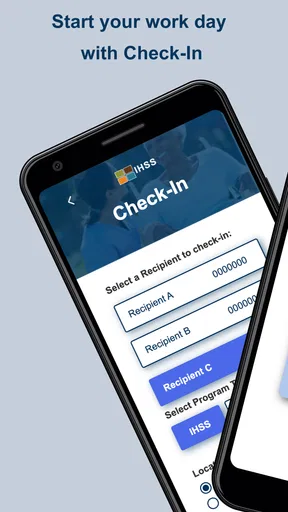
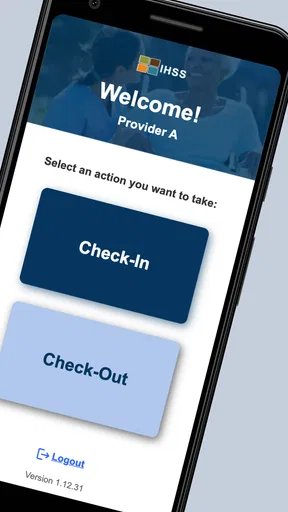
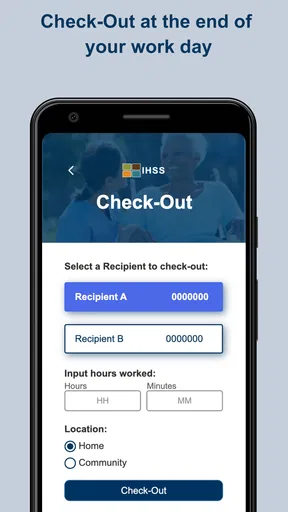
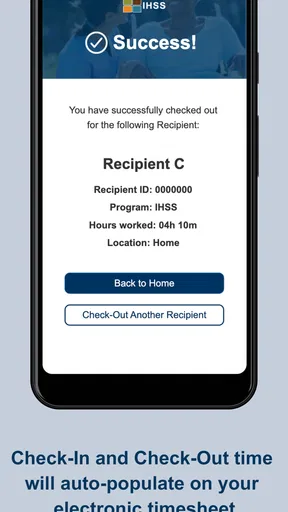
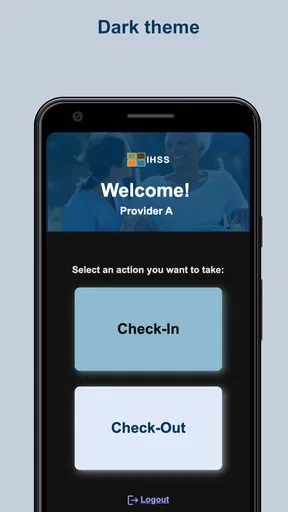
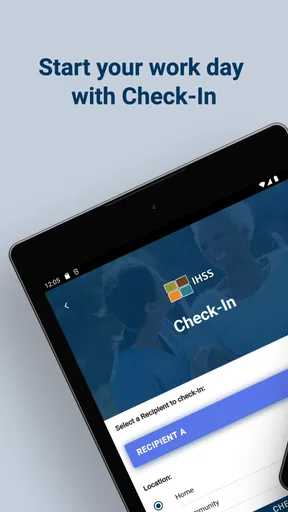
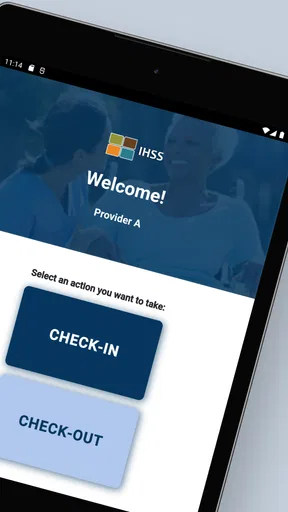
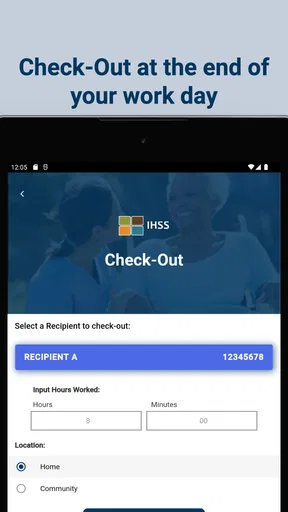
- Easy Check-In/Check-Out: The app simplifies the process of marking your arrival and departure times. No more paper logs or manual entries; just a quick tap and you’re done!
- Location Verification: It uses GPS functionality to verify your location during check-ins and check-outs, ensuring compliance with EVV requirements.
- Real-time Updates: Get instant notifications and updates about your visits, ensuring you’re always in the loop.
- User-Friendly Interface: The app’s design is intuitive, making navigation a walk in the park even for the tech-averse among us.
These features are pretty handy, especially when you consider the importance of accuracy in reporting hours worked. It’s all about making life easier for caregivers and ensuring recipients get the support they need.
Worth Reading Before You Choose

EA SPORTS FC Mobile 26 Is a Bigger Football Game, but It Takes Time

Flipboard Shows What News Apps Must Do Beyond the Feed

Switching to Android Auto Means Rethinking Your Driving Routine

Google Calendar Makes a Crowded Week Easier to Manage

Ludo King Makes the Most of the Minutes Between Plans

Baby Panda World Brings Quick Play to Modern Phones, but Its Game Library Feels Busy
Making check-ins part of the visit routine
A useful way to think about check-in is as a small boundary between arriving and starting care, not something to squeeze in later while you are already busy. In a realistic morning visit, I would first make sure I have the phone available, open the app, and complete the arrival step before settling into the recipient’s routine. At the end, I would treat check-out as part of wrapping up, rather than trying to reconstruct the time after leaving. That habit is simple, but it reduces the chance of relying on memory for a task meant to record a visit.
There is a practical trade-off in the location check. It supports verification at the time of the visit, but it also means location matters to the workflow. I would avoid assuming that a successful check-in is guaranteed by being somewhere nearby: use the app at the appropriate visit location and pay attention to any response it gives. If the phone is slow or the location cannot be established, pause and follow the program’s current instructions rather than repeatedly tapping and hoping that a record has been made.
One non-obvious tip is to make the first check-in on a new phone or after a change in routine before you are in a hurry. That gives you a chance to learn where the relevant controls are and notice whether the device is ready for the task. It is also sensible to keep the phone charged enough for both ends of the visit. The app’s check-in process may be quick, but a dead battery at departure can turn a brief task into a stressful one.
Trust, location, and the moments that matter
GPS verification is the most sensitive part of the stated workflow because it connects a work record with location at check-in and check-out. I would treat that as a reason to be deliberate, not as a reason to assume the app continuously follows a provider. The function described is verification during those actions; it does not by itself establish broader tracking behavior or explain every detail of data handling. For a privacy-conscious provider, the right move is to review the app’s current permission prompts and device settings, and to make a decision based on what the phone actually asks to access.
That distinction matters in a recipient’s home. I would not leave a device displaying visit details where other people can casually see it, and I would avoid discussing account credentials in front of anyone who does not need them. These are ordinary precautions for a work account, especially when an app is used in a private household. They do not require treating the tool as suspicious; they simply keep a routine record-keeping task separate from personal phone use.
Account setup is another point where patience pays off. Use the information the program expects and double-check it before relying on the app for a visit. If access fails, a provider should use the appropriate official support or program route instead of sharing credentials or trying a workaround found in an unrelated forum. The app’s role is administrative and specific, so a login problem is best handled as an account issue rather than solved by recording care details in an improvised substitute.
My Experience Using the App
Alright, let’s talk about my personal experience with the app. Right off the bat, the installation was smooth, and setting up my account took just a few minutes. Once inside, I found the layout to be intuitive. Everything is where you’d expect it to be, which is a huge plus if you’re not a big fan of fumbling around with tech.
The check-in and check-out process is super quick. I loved that I didn’t have to deal with any unnecessary steps. Just a couple of taps and my work hours were logged. The GPS feature is also a nice touch, giving peace of mind that everything is recorded accurately.
Notifications are timely, ensuring you never miss a beat with your schedule. Whether it’s a reminder or confirmation, the app keeps you informed without being intrusive.
Where it fits beside other everyday tools
Compared with paper notes or a personal calendar, this app is more directly suited to the formal EVV task because its purpose is check-in and check-out, with location verification. Paper can feel reassuring when a phone is unavailable, and a calendar can help organize appointments, but neither should be treated as a replacement for the required electronic process. I would keep personal planning tools for personal reminders and use the designated app for the official visit actions.
That focus is also its main limitation. Someone who wants one place to manage a care plan, communicate with family, track medications, and log hours may find this too narrow. It should not be mistaken for a complete caregiver platform. Likewise, a recipient looking for an app to monitor or arrange every part of their support may need a different resource for those needs; this is principally useful to providers carrying out the EVV steps.
For a provider with repeated visits, the small advantage is consistency: the same basic check-in/check-out routine can be attached to each visit instead of relying on a collection of notes and reminders. For a person who rarely handles visits or who is not part of the relevant California programs, that convenience is unlikely to outweigh the effort of installing and learning a specialized app. The audience is deliberately specific, and that is a strength only when it matches your work.
Who’s It Best For?
The IHSS EVV Mobile App is a must-have for anyone involved in the IHSS program. If you’re a caregiver, this app will save you a ton of time and hassle by automating a lot of the manual processes. For recipients, it ensures transparency and reliability, knowing that the support they receive is well-documented and verified.
It’s also fantastic for those who aren’t super tech-savvy. The app does a great job of keeping things simple without sacrificing functionality. So, whether you’re a tech wizard or someone who prefers to keep things basic, this app is designed for you.
I would qualify that recommendation for anyone who has unreliable access to a compatible phone, finds location prompts uncomfortable, or expects the app to handle tasks beyond visit verification. The minimum operating-system requirement is Android 7.0, and the current version is 1.7.0, so checking compatibility before depending on it for work is sensible. It was released on February 21, 2022; the practical question is whether it works on your own device and fits the current process you need to follow.
A common practical question is whether it replaces every other work record. I would not assume that. The app is for the EVV check-in/check-out step, while any separate instructions from the program or employer should still be followed. Another reasonable question is what to do if the phone cannot complete a visit action. The safest approach is to follow current IHSS or WPCS guidance for that situation, rather than inventing a personal substitute or assuming the app has saved something it has not confirmed.
People also often want to know whether location verification means constant location access. The described purpose is to verify location during check-ins and check-outs; the actual permission choices should be checked on the device when installing and using the app. If a prompt is unclear, review the phone’s permission controls and seek an official explanation before changing settings that could interfere with the required workflow. That is more useful than making broad assumptions about privacy from the presence of GPS alone.
Final Thoughts
In a nutshell, the IHSS EVV Mobile App delivers on its promise to make the EVV process smoother and more efficient. It’s user-friendly, packed with essential features, and truly takes the hassle out of managing in-home support services. If you’re part of the IHSS community, it’s definitely worth checking out.
My cautious verdict is that this is a practical, purpose-built option for eligible providers who want a straightforward way to record visit starts and ends. I would recommend it when the EVV workflow is part of your role and your phone supports it, while keeping expectations narrow: it is not a care-management suite, and location-based verification deserves a deliberate look at permission prompts and account access. The strongest approach is to learn the routine before a busy visit, confirm each action in the moment, and keep official program guidance close for exceptions.
So there you have it, my take on the app. Now, it’s your turn to give it a try and see how it fits into your daily routine. Happy exploring!
Pros
- User-friendly interface for easy navigation.
- Real-time updates enhance reliability.
- Secure login ensures data privacy.
- Supports multiple languages for accessibility.
- Offline mode available for remote areas.
Cons
- Requires frequent updates for optimal use.
- Limited compatibility with older devices.
- Battery consumption is relatively high.
- Occasional syncing issues reported.
- Initial setup can be time-consuming.
FAQs for IHSS EVV Mobile App
What is the primary function of the IHSS EVV Mobile App?
The IHSS EVV Mobile App is designed to streamline the process for In-Home Supportive Services providers by enabling them to electronically verify their visits. It helps ensure compliance with the federal mandate for Electronic Visit Verification (EVV), making it easier to track and manage service hours accurately and efficiently.
Is the IHSS EVV Mobile App available for both Android and iOS devices?
Yes, the IHSS EVV Mobile App is available for download on both Android and iOS platforms. Users can find the app on the Google Play Store for Android devices and the Apple App Store for iOS devices, ensuring broad accessibility for all providers who need to use the service.
How does the IHSS EVV Mobile App improve the service process for providers?
The app enhances the service process by allowing providers to log their start and end times electronically, reducing paperwork and potential errors. It also offers real-time data tracking, which helps in efficient time management and ensures that all service hours are accurately reported and verified in compliance with the EVV requirements.
What are the privacy measures in place for the IHSS EVV Mobile App?
The IHSS EVV Mobile App incorporates robust security protocols to protect user data. It requires secure login credentials and encrypts all personal and visit information. This ensures that sensitive data about both the provider and recipient is kept confidential and protected against unauthorized access.
Are there any costs associated with using the IHSS EVV Mobile App?
No, there are no costs for downloading or using the IHSS EVV Mobile App. It is a free tool provided to all eligible providers to help them meet the federal requirements for Electronic Visit Verification without incurring additional expenses, ensuring seamless integration into their workflow.


